Using Calendar Discipline to Improve Meetings

When Reshan Richards and I are working with leaders on a very pragmatic level, we often find ourselves thinking about meetings. That’s where leaders spend a lot of their time, advance a lot of their projects, and solve a lot of their problems.

Some meetings are set in advance and repeat. These are sometimes called “standing meetings.”

Other meetings are called to address a specific need / solve a problem / deal with an urgency. These are often referred to as “impromptu” or “just-in-time” meetings.

If you’re calling and leading one of the latter, the meeting can be greatly enhanced by adding some simple calendar discipline to your routine.

Here’s what we suggest:

First, find a time for the meeting in a way that doesn’t clutter up people’s inboxes. So, instead of emailing the group and asking each member to share his or her availability, precipitating a blizzard of REPLY ALLs, send a Doodle Poll or build a quick table in Google Docs to allow people to give their input once. Then, you can make a decision about the best possible date and time and invite the participants.

You can invite people in one of two ways. You can send them an email with the pertinent details, or you can skip that step — recommended — and send them a calendar invite that appears on their calendar and allows them to accept it.

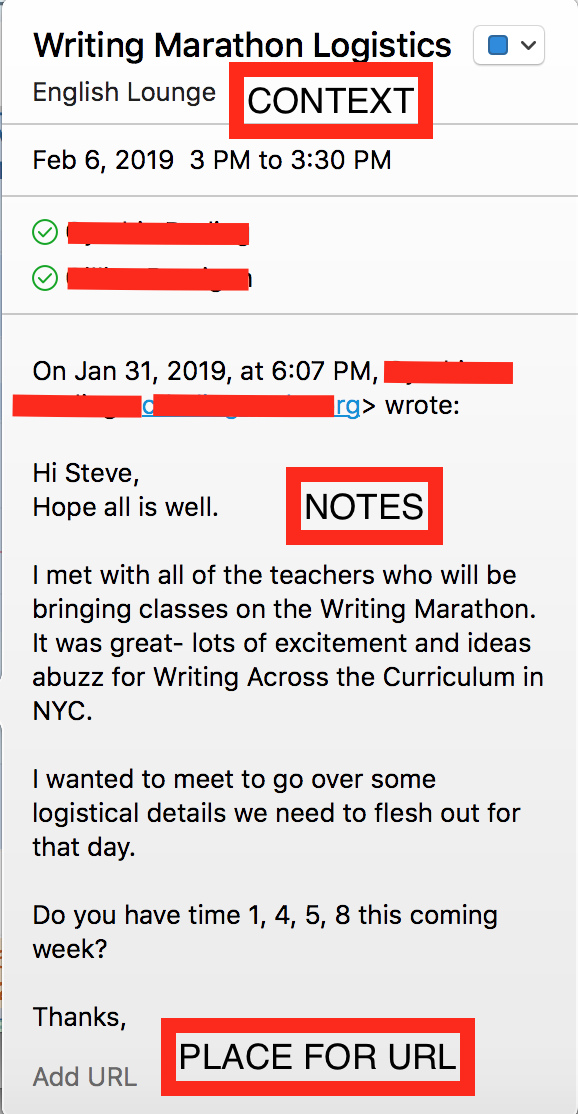
Let’s drill down into the calendar invite process, because that’s where many leaders can still improve. Start with a good, general title that tells people the purpose of the meeting. Then, add as much contextual information as you can, including the time and the location of the meeting. Finally, and one layer deeper, add any relevant notes.

Purpose, context, and notes embedded in the calendar invite itself: these items allow the event marker to function as a form of “glance media” for the meeting participants. They can read it when they are preparing for the meeting, or if they are too rushed to prepare, the event marker can, at the very least, help them to attain a just-in-time understanding of the meeting on their way into the meeting.
Once the meeting is shared in that manner, you can feel that you’ve taken some important steps to help meeting participants take responsibility for their part of the meeting. You might share an agenda at some point or share one at the meeting.

At any rate, your next set of steps involve your own calendar, and your own level of responsibility for a meeting that you called. Go to your own calendar and schedule the BEFORE and the AFTER work that will make the meeting a success. We like to schedule our planning sessions two or more days out and our follow-up sessions immediately after the meeting. You’ll notice in the example below that the planning session and the follow-up session are as long as the actual meeting. That’s an ideal time distribution. Both can be condensed as needed, or to create found time in your schedule if you do what you need to do in 25 minutes.
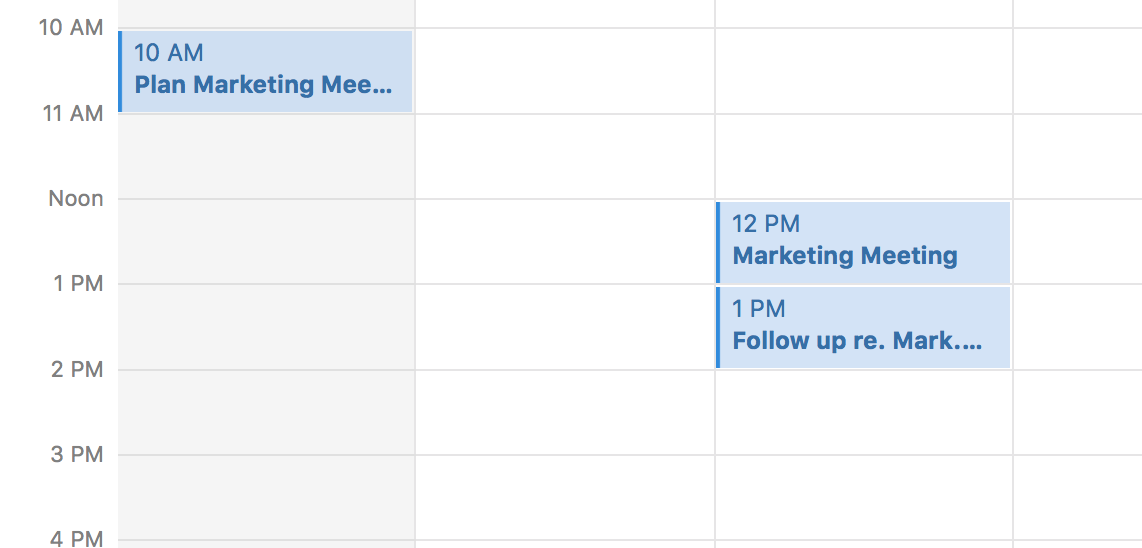
This three part discipline — creating detail rich event markers and then scheduling your Pre and Post- meeting work — allows you to take seriously what it takes to plan, execute, and carry forward an effective meeting.

Saturday Summary

This past week I wrote posts about:

Now they’re all in one place for you, easily accessible as you sip your morning coffee and make your weekend plans. Hopefully, I’ll make this pleasant distraction / invitation to serendipity a regular thing each weekend.

Last week’s summary.

Football: A Meditation

In honor of Sunday’s Super Bowl, I’m going to jot down a list of things I’ve learned from watching football that seem broadly applicable to life and work, individual performance and team performance. Here goes . . .

To have a good day at work, you only need to average a few yards per carry.

Sometimes, you have to go for the big play. It’s helpful, in achieving the big play, if you’ve already done the work to give that big play a chance of succeeding.

The purpose of attempting a big play is not always what it seems. Yes, it’s great if it works; it’s great if your quarterback hits your lightning quick receiver with a 70-yard touchdown pass. But even if the big play doesn’t work, if you call the big play and try to execute it, it shows your team that you believe in them . . . and it shows the other team that you’re always capable of a break-out move.

With that said, desperation in the form a a “Hail Mary” is rarely rewarded. It’s fun to watch, but does it work?

It’s important to know whether you’re playing offense or defense. And, once you’ve sorted that out, it’s important to excel on both sides of the line.

Sometimes you have to punt.

A good coach or teammate can reset your attitude, helping you to do things that you don’t want to do but you know you need to do in order to win. (And, as a good coach or teammate, your job is to do the same resetting for others.)

In order to have a winning season, you have to stay healthy. You have to stay in the game, each game. And the same goes for your teammates.

Honor an honest competitor as fiercely as you abhor a cheat.

A trick play every now and again is a referendum on the deep and basic joy of the game itself. It’s important to keep that joy alive, for both the players and the fans.

Out of School

I sent this list to the senior class at my school today. It’s a short list of things they can do during their May Term, which is a stretch of time when they do not have classes and can design a project in the aim of completing it before graduation. Repurposing it for RW, I realize it’s essentially a list of all the things you can do if you want to learn and you’re not in school. It was partially authored by my colleague, Jill Maza. It’s not exhaustive, but it’s a start.

  • Write a novella.
  • Make a documentary.
  • Interview professionals in an industry that interests you.  
  • Perform service at an organization that matters to you. 
  • Make music.
  • Explore and document a particular aspect of a city (economics, architecture, culture, etc.).  
  • Make a podcast about a subject that fascinates you. 
  • Write a collection of poetry.
  • Make art.  
  • Learn to code.  
  • Perform.
  • Dance.
  • Do stand-up comedy.
  • Make a robot.
  • Make an electric motorcycle.
  • Record a series of lessons about a topic that, you believe, others should understand.
  • Write a play.  Have your friends perform it.
  • Make a movie.  Have your friends act in it.
  • Join Startup 101.  
  • Teach at one the MKA campuses.
  • Do research (and remember, research can be more than a history paper).  
  • Take photos. 
  • Study all the business models in a particular industry. 
  • Build something.  (A surfboard; a golf club.)
  •  Study something in ridiculous detail.
  • Write a curriculum. 
  • Design a game.
  • Write a book.
  • Vlog about a personal passion or pursuit.
  • Use a talent to give back to your school.
  • Spend time serving a social issue of meaning to you.
  • Design a solution to an issue you see in the world.

Intended Unintended Consequences

My daughter’s school has a 1:1 program. This means: a few days ago, in January of her 4th grade year, she received a laptop for use at school and at home. She’ll use this laptop for a variety of planned and unplanned activities until she graduates, and it will be upgraded every 3 years. (Pretty nice.)

One of the first things she did was ask me if she could use the laptop to watch Netflix programs at home. (Pretty not nice.) I agreed, but I explained to her that she has to follow Valentine’s Law (which I made up on the spot to sound authoritative): when using a computing device, always balance out consumption with making, and make sure that, in total, you’re making more than you’re consuming.

The next day, she emailed her campus tech coordinator, and she copied me:

Is it possible to download Skitch 3.0?

I replied / translated:

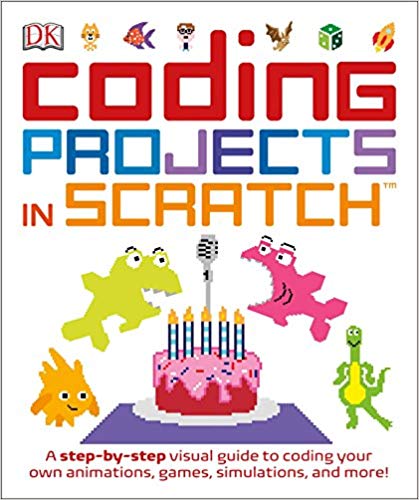
I think you mean Scratch 3.0?

She wrote back:

Yes!

When I came home from work, I saw her reading a book next to her open laptop:

What’s that?

Mrs. H. gave it to me after I emailed her about Skitch, I mean Scratch.

Then she kept talking:

I can’t download 3.0 because of this.

She showed me an image on her screen:

You don’t have the right operating system?

Nope. But I can use the online version. I made something.

She then pressed a button on her computer and it showed a girl. She pressed it again and numbers appeared. One more time and the numbers moved into a row. One more: the numbers added up.

The girl adds the numbers. The girl does math.

At that moment, I was proud of my daughter and proud of her school.

If I unpack how we got here, you’ll see why.

My daughter’s school handed her a powerful machine and taught her how to properly use it and respect it.

(Valentine’s law was born, and helped a bit, so I’ll take some credit.)

My daughter emailed a school administrator and copied me on the email. Somehow, she learned how to do this. Somewhere along the way, she received a signal from her school that it was okay for her to advocate for herself (an SEL skill), and somewhere along the way, she learned how to email appropriately (a technical / communication skill).

An administrator told her no — for Scratch 3.0 — but explained why. (Plenty of school administrators would have simply said no.) This led to a lesson about operating systems. In 4th grade.

The administrator then gave her a book on the topic and showed her an end-around. She could use the web-based version instead. This would tide her over until the school upgraded to a new operating system.

When she accessed the web-based version, it was kid friendly. (So, now I’m also proud of / thankful for Scratch.) She could choose an avatar that looked like her. And she could make that avatar do arithmetic, which in her mind/world, is serious math.

Think of how many good and generous educational decisions need to be made to reach this point. Think of the kind of culture — at my daughter’s school, in the lab responsible for Scratch — that helps these kind of intended unintended consequences to happen.

Automate Global, Humanize Local

Last night, as my family reached the end of the Thursday of an overly long week, we all knew that we really needed to meet up at our dining room table around piles of delicious comfort food. We didn’t want to cook or do dishes. We didn’t want to think. We wanted food from our local Mexican place.

I had all of our particular favorites memorized, so I called in the order and prepared to relax before driving to the store to pick up the food. A few minutes later, my phone rang. It was a local number, so I answered.

The voice on the other end belonged to someone from the restaurant. He asked me about one of my orders — mine, it turns out — and wanted to know if I really wanted sauce A instead of sauce B.

“I want sauce A,” I said. “Did I order sauce B?”

“Yes,” he said, “I’ll fix that for you.”

When I arrived at the restaurant, I ended up talking to the man who had called my house. I told him I was really glad he had reached out to me, because sauce B would have ruined my meal. Sauce A is the main reason why I order the meal in the first place.

He then said, “yeah, that mix-up has been happening a lot lately with our new ordering system. When our receptionists answer the phone and take orders, they tap through a menu, and the item you ordered automatically generates a choice. So they ask a question they never used to ask, and lots of customers end up making the wrong choice.”

The new system is automated in ways that improve a lot of back end details, but it’s wreaking havoc on those of us who only order chicken enmoladas because we crave the mole sauce. Luckily, at this restaurant, there’s a caring human watching over the transactions, allowing the system to serve both the restaurant and the customers.

Automate global; humanize local.

N.R.N.R.

N.R.N.R. is an acronym I’ve started using. It means “not responsive, needs reminders.”

It comes up when I’m trying to accomplish something that requires input or expertise from other people, which is often.

Some of those other people are very responsive, in that they return emails and calls in a timely fashion. They allow information to keep moving. They allow decisions to be made and project dominoes to fall. They honor, and fan, momentum.

And some of those other people are not responsive, in that they don’t return emails or calls in a timely fashion (or at all). They prevent information from moving or decisions from being made.

Assuming I want or need to keep working with the latter — perhaps they have an outsize talent, provide an invaluable resource, or simply sit above me in the food chain — I know I have four choices:

  1. I can try to change them, which may take a lot of time and coaching.
  2. I can allow frustration to consume me, which may take a lot of personal energy.
  3. I can wait, which could ruin my momentum and cause me to miss deadlines, i.e., look bad.
  4. I can acknowledge that this person or group’s non-responsiveness is a fact — like a snowstorm or a pothole or a bad call in a game — which means I should plan accordingly.

Assuming I choose choice four, which is often most pragmatic, when I email this person or team, I add two or three events to my calendar, spaced out over time, that simply list the person or team’s name followed by the letters NRNR. That prompts me to nudge the non-responsive people in my life at a limited cost to my own systems and workflows. I usually get what I need . . . and sometimes they even improve over time, allowing me to drop the acronym from their name.